
WordPress 7.0 “Armstrong” Is Out – Here’s What’s New
WordPress just dropped its biggest release in years, and if you’ve been paying attention to where the platform has been heading, version 7.0 “Armstrong” makes a lot of sense.
Named after Neil Armstrong – the first person to walk on the moon – this release is, fittingly, about taking a significant step forward. Not a chaotic leap, but a deliberate, well-planned one.
Here’s what you actually need to know.
TL;DR
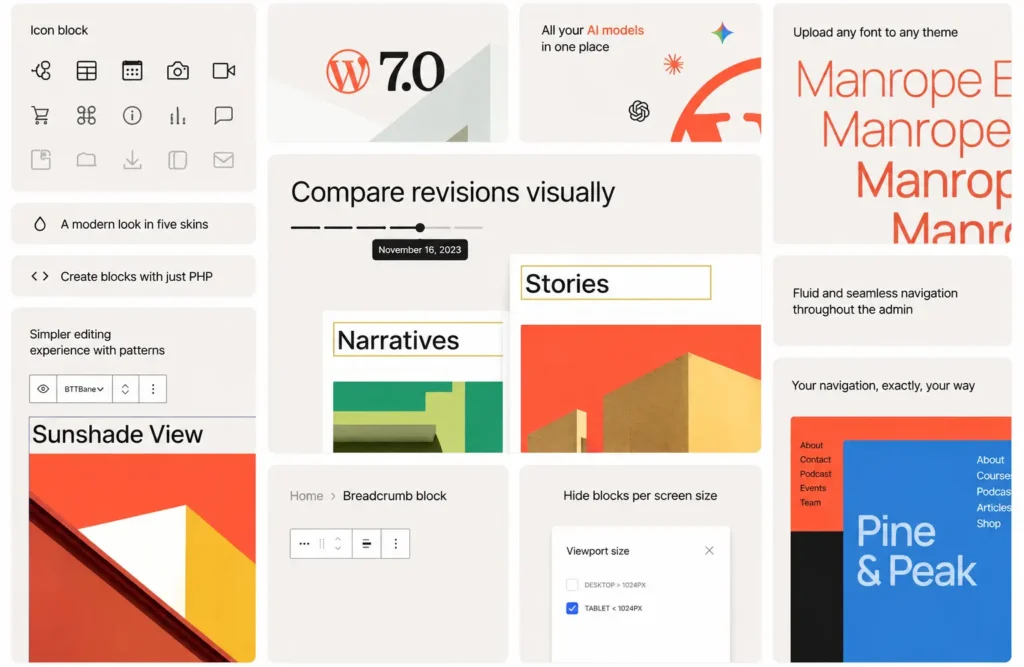
- AI built in : Connect Claude, ChatGPT, or Gemini through a single Connectors screen. Opt-in only, nothing shared automatically.
- Better revision tracking : Review changes visually and restore previous versions with confidence.
- Cleaner admin : New color scheme, smoother transitions, and a Command Palette shortcut in the top bar.
- Mobile-first design tools : Custom navigation overlays, responsive block visibility per device, and simpler pattern editing.
- New blocks : Breadcrumbs, Icons, improved Gallery lightbox, and block-level CSS for targeted styling.
- Fonts everywhere : Font Library now works across block, hybrid, and classic themes.
- Stronger foundations : Faster loading, better accessibility, and expanded APIs for developers.
Everything New in WordPress 7.0
Although the original release was backed up, the new version brings a planned update to the table:
The Headline: WordPress Now Has an AI Layer – But It’s Opt-In
The most talked-about part of WordPress 7.0 is its new AI infrastructure, and the most important thing to understand about it is that it doesn’t do anything automatically.
No data is sent to any AI service the moment you update. Everything has to be switched on by the site owner, intentionally.
What Automattic has built is a shared foundation – a common system that lets plugins connect to AI providers like Claude, ChatGPT, and Gemini through a single, standardized interface called the AI Client.
Before this, every plugin that wanted AI capabilities had to build its own connection from scratch. That led to a fragmented, inconsistent experience across the ecosystem. WordPress 7.0 fixes that at the platform level.
Alongside the AI Client is a new Connectors screen – a central dashboard where site owners can see and manage every external service their WordPress site talks to. Think of it as a control room for integrations.
For WordPress.com users specifically, this builds on tools already live on the platform: the AI Assistant, Claude connections, and Studio workflows.
But for self-hosted WordPress sites, the AI features require the optional AI plugin, which unlocks things like AI-assisted title generation, excerpt writing, image generation and editing, and automatic alt text suggestions inside the editor.
For anyone concerned about privacy: you stay in control. The AI layer is infrastructure, not automation. It doesn’t act without your permission.
The Editor Got Noticeably Better…
Beyond AI, WordPress 7.0 brings a round of editing improvements that are immediately visible to anyone who logs in.
Visual revisions is the one I’d flag first. Reviewing the history of a post or page used to mean wading through a text-based diff view that was hard to parse quickly.
Now, changes are marked visually, you can navigate between versions, and restoring a previous version is a much more confident action.
Anyone who’s ever accidentally overwritten a post they wanted to keep will appreciate this.
The admin dashboard has been refreshed with a new default color scheme, smoother screen transitions, and a Command Palette shortcut added to the top admin bar.
If you’ve used command-palette features in tools like Notion or VS Code, the concept is familiar – it’s a fast keyboard-driven way to jump between tools and actions without clicking through menus.
The Font management has also been unified. The Font Library now works across block themes, hybrid themes, and classic themes – previously it was limited to block themes only.
Mobile Design Got a Real Upgrade
Designing for mobile inside WordPress has always involved some degree of compromise. Version 7.0 addresses several of the most persistent friction points.
Navigation overlays – the menus that slide or appear on mobile – now have their own dedicated editing canvas.
Previously, you were limited in what a mobile menu could actually look like. Now, you can build a proper overlay using blocks, columns, custom typography, and your own close button design. Start from a template or build from scratch.
Responsive block visibility is new too. You can now specify which blocks appear on desktop, tablet, or mobile independently.
If you want to show a detailed sidebar on desktop but hide it entirely on mobile, that’s now a native setting rather than a workaround requiring custom CSS.
Patterns – reusable design sections – are also easier to edit now. They now behave more like a single unified block, so you can update the text and images in a pattern without having to dig through every nested element inside it.
New Blocks and Design Controls
WordPress 7.0 adds and improves several blocks that have practical day-to-day uses:
- A Breadcrumbs block is now available natively – useful for content-heavy sites, e-commerce stores, or any site where visitors need to understand where they are in a structure. Previously this required a plugin.
- An Icon block adds a built-in library of simple visual icons directly in the editor, without third-party dependencies.
- Gallery lightbox behaviour has been improved, making image browsing smoother for visitors. The Heading block has been updated to make working with page structure more intuitive.
- Block-level CSS is a significant addition for anyone who’s ever wanted to apply a small, targeted style to a specific block without it affecting everything else on the page. It’s the kind of feature that reduces the need for theme customizations or child themes for minor styling needs.
Under the Hood: Developer Changes That Will Matter Later
A portion of WordPress 7.0’s changes won’t be visible to site owners on day one – but they’ll shape what WordPress can do over the next few years.
The release includes expanded APIs, PHP-only block registration (which simplifies plugin development), a more extensible Site Editor, and improved routing that lets plugins build custom Site Editor pages more cleanly.
WordPress 7.0 also includes improved editor stability, accessibility enhancements, and performance optimizations for faster page loading.
The release was built by more than 875 contributors from around the world – a figure worth noting because it reflects the scale of the open-source community behind WordPress, which still powers around 43% of all websites on the internet.
What’s Already Live on WordPress.com
For those on WordPress.com managed hosting, much of this is either already live or rolling out now. The new AI foundations connect with the AI Assistant and Claude integration the platform already has.
Real-time collaboration – letting multiple team members edit the same site simultaneously – is available on select plans, ahead of wider availability.
Self-hosted WordPress users can download 7.0 from WordPress.org or update through their dashboard now.
The Bigger Picture…
WordPress 7.0 is a release that does two things at once. It delivers visible, practical improvements for everyday site work – better revision tracking, smarter mobile design, more responsive controls, a cleaner admin experience.
And it lays infrastructure that will enable a more AI-integrated future without forcing that future on anyone who isn’t ready for it.
That balance – useful now, forward-looking without being pushy — is exactly what a platform update at this scale should be.
“Armstrong” is a fitting name for it.
